Every customer conversation, answered and on the record.
WhatsApp, Instagram, SMS, email and web chat in one inbox. AI agents book, answer and qualify, and every customer lands in a built-in CRM. Our team sets it up and runs it with you: live in days, on our cloud or yours.
- One inbox for every channel
- AI agents that act in your tools
- Built-in CRM
- Your cloud or ours
Example conversations
Plugs into the tools you already run
 Shopify
 Stripe
 HubSpot
 Zendesk
 Intercom
 QuickBooks
 Notion
 Airtable
Product
One place to run every conversation.
See the screens your team works in.
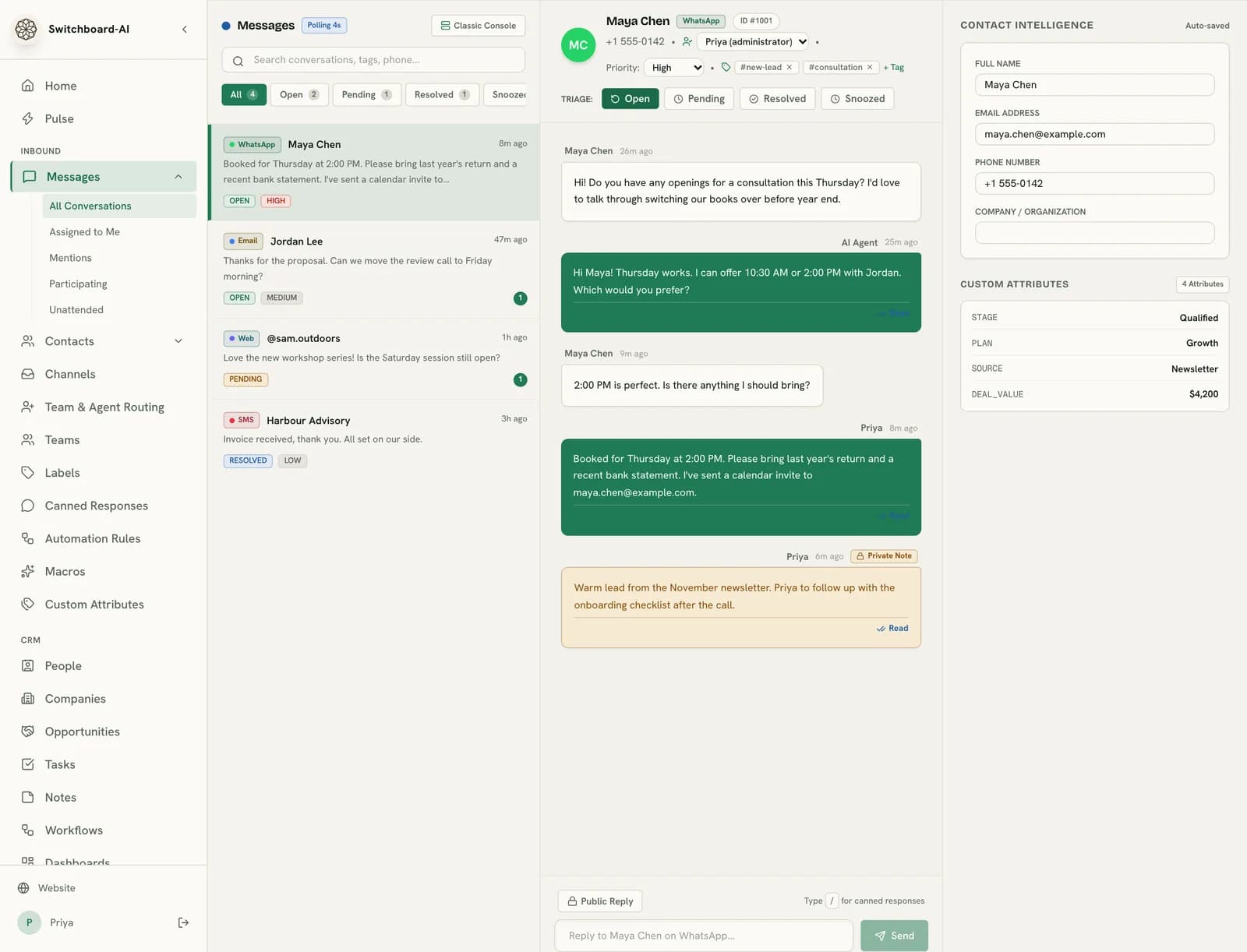
Every channel in one queue, one history per customer.
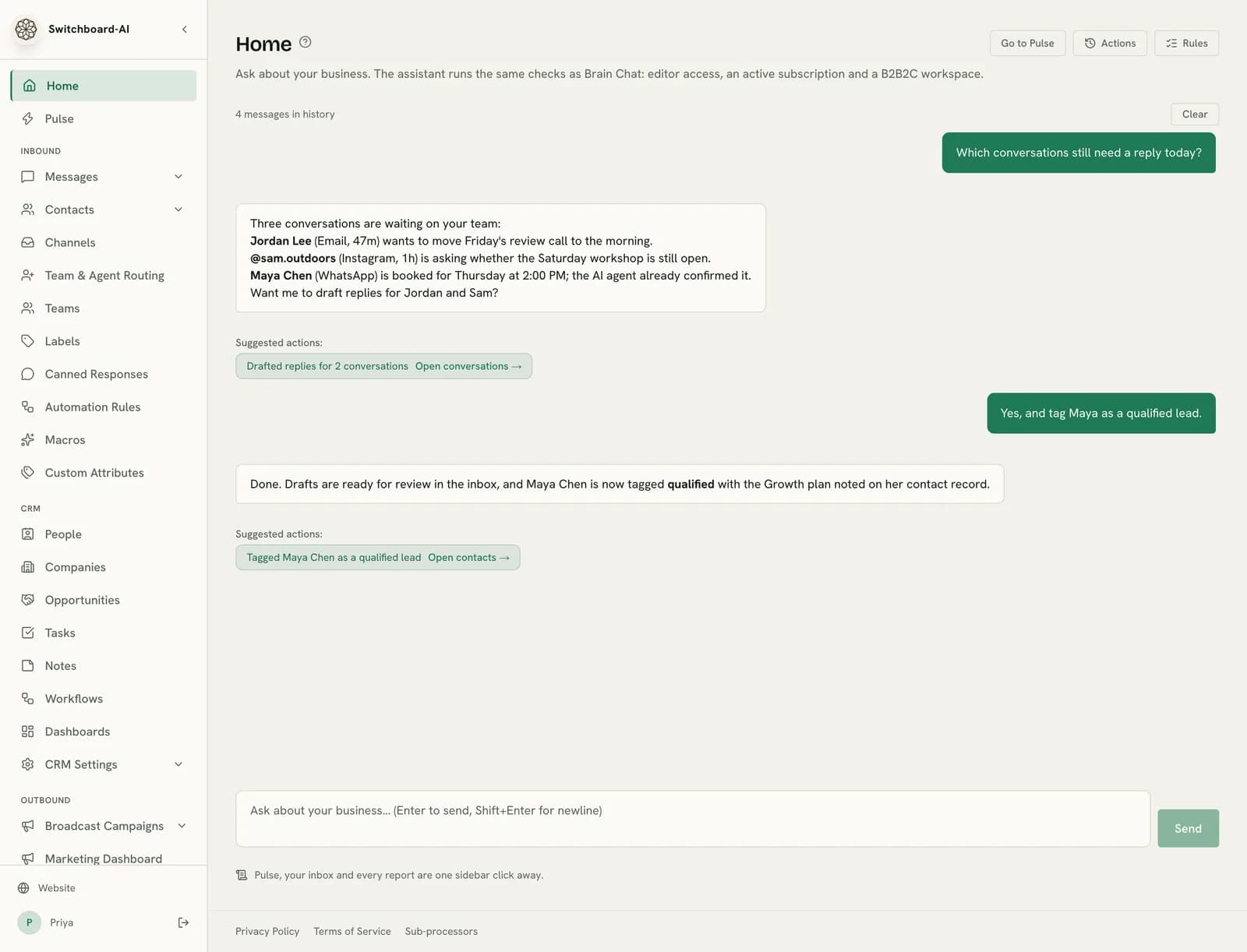
See what each agent did, and approve what it should do next.
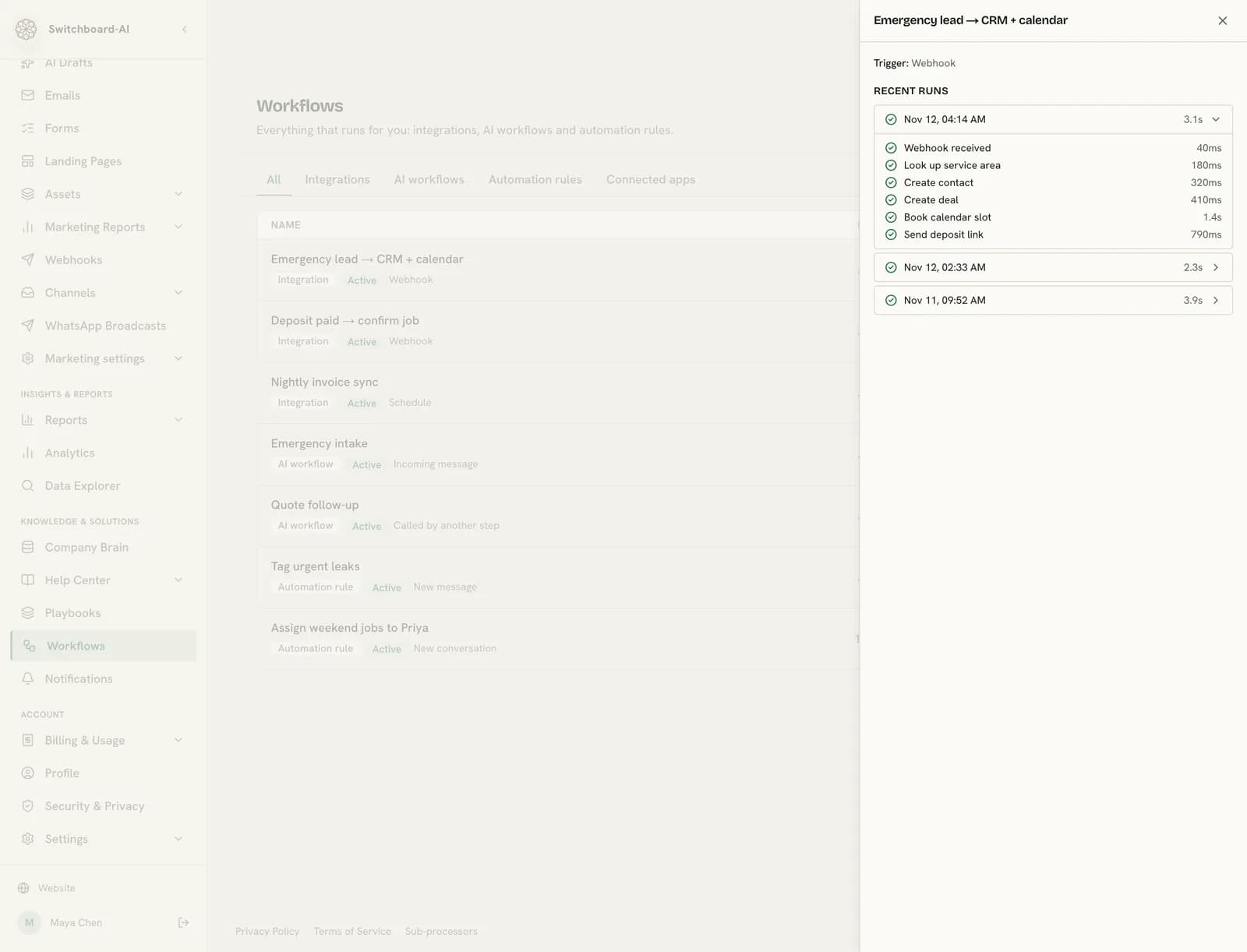
Every automation, AI workflow and rule that runs for you, with each run step by step.
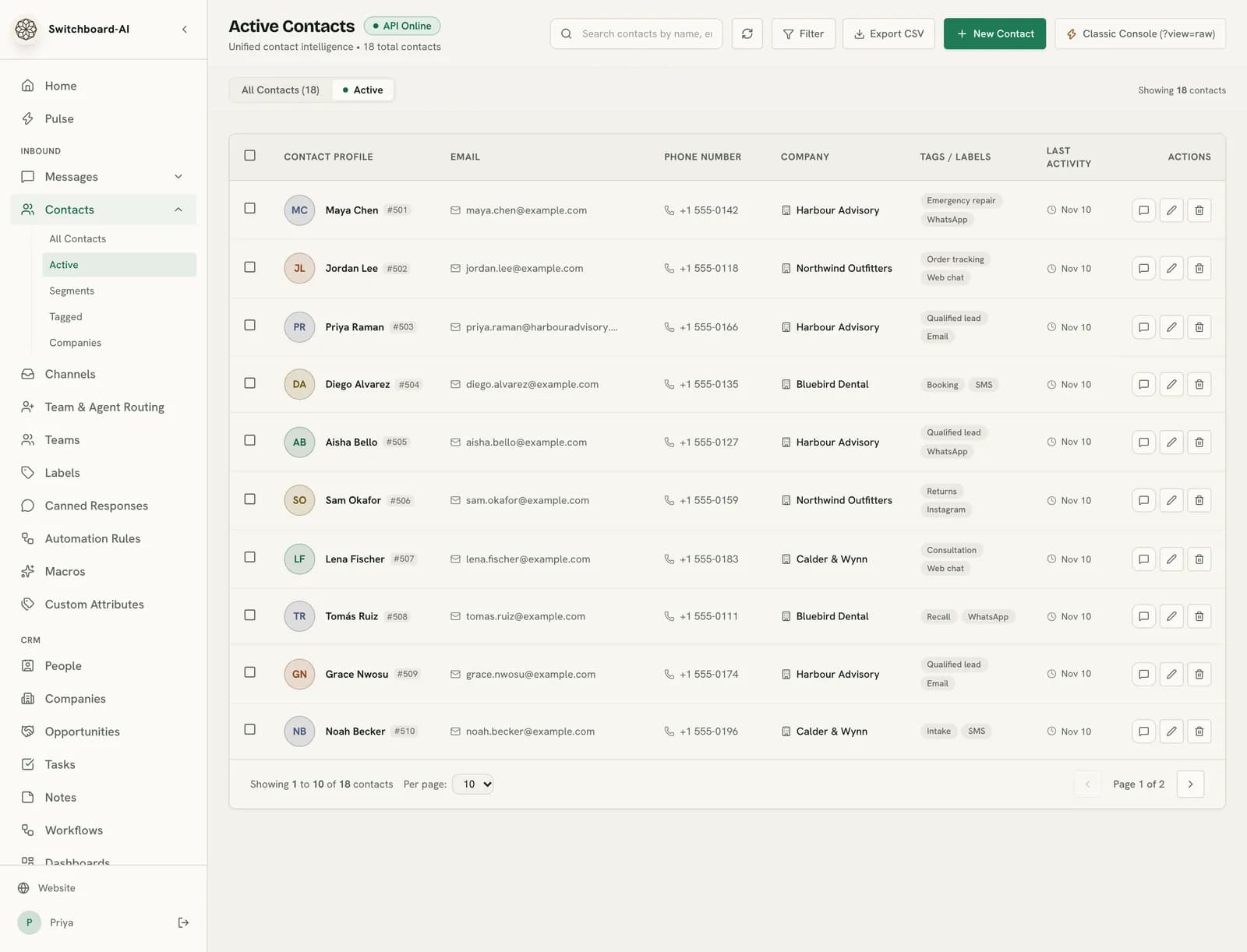
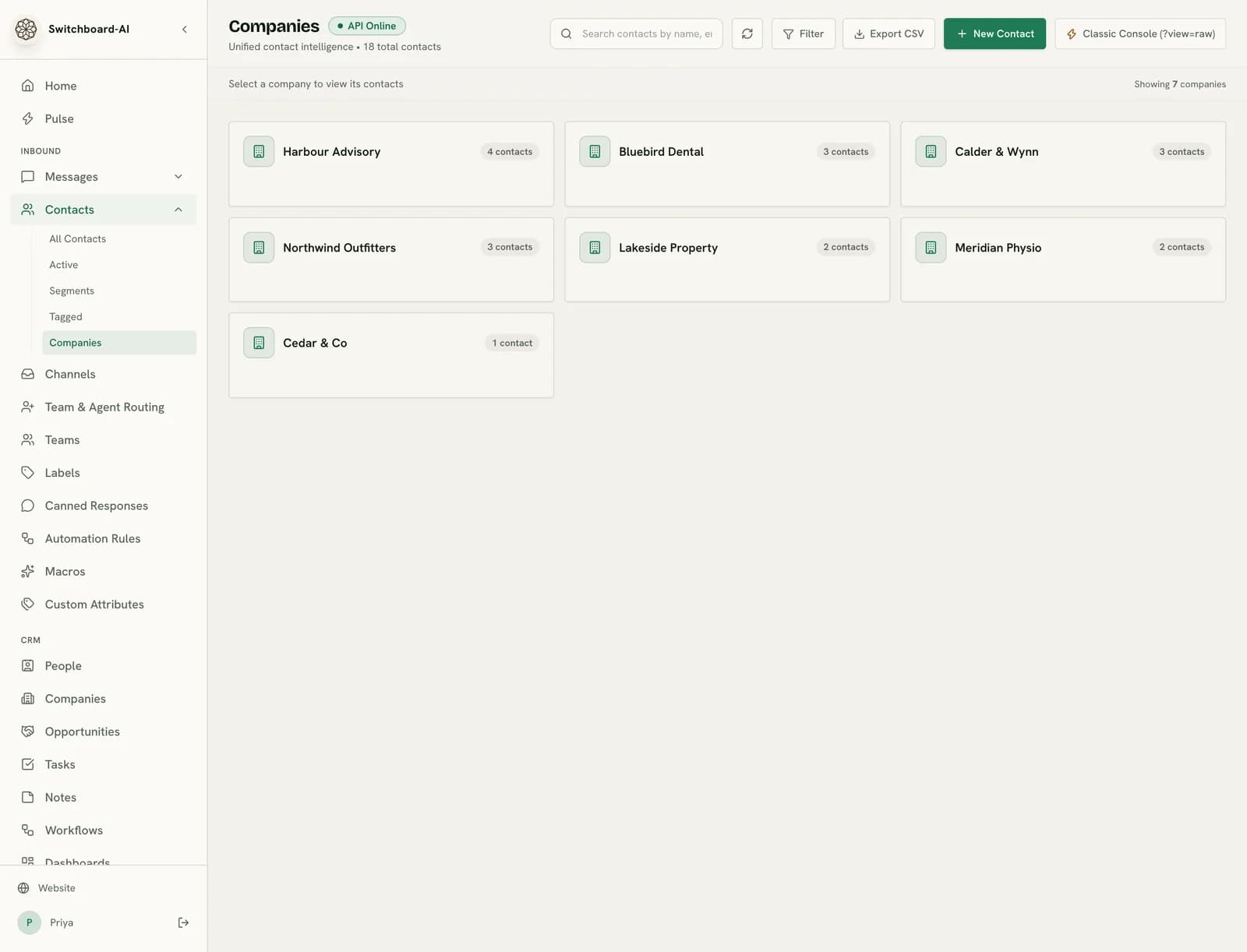
People, companies and deals, filled in from every conversation.
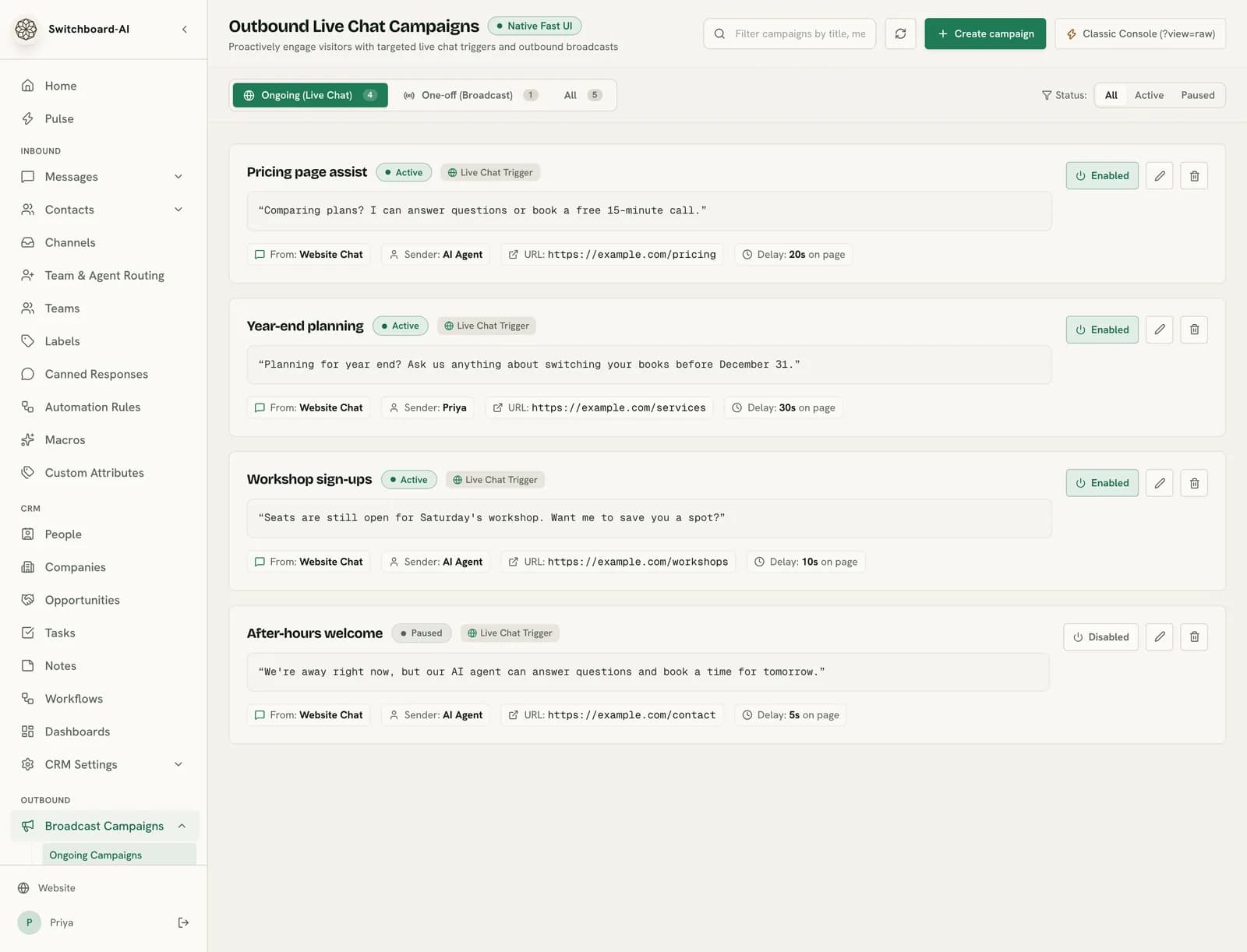
Follow-ups and email campaigns to the customers you already have.
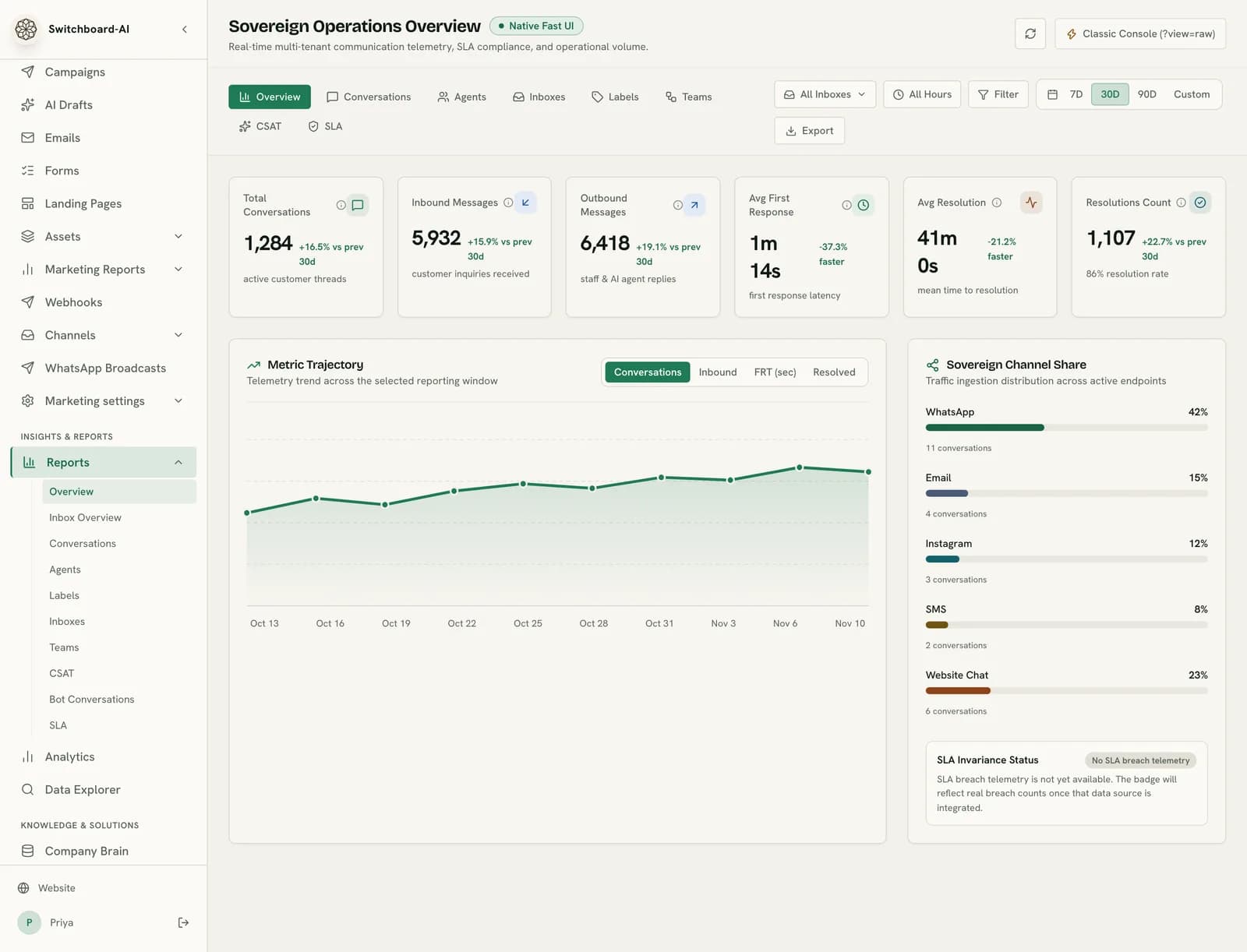
Volume, response times and handoffs across every channel.
Meet the agents
Three agents, each with a real job.
Each follows a playbook we write with you: what it can answer, what it can do in your systems, and exactly when it hands over to a person.
Booking agent
Books, moves and confirms appointments against your live schedule, then sends the reminders that stop no-shows.
- Reads open slots and chair rules
- Moves, books and cancels appointments
- Sends confirmations and reminders
- Hands urgent pain or swelling to staff
Hi, can I move my cleaning on Thursday to sometime next week? Mornings are best.
Checked schedule · 3 morning slots open
Of course. I can do Tuesday 9:00, Wednesday 8:30 or Friday 10:15. Which works?
Wednesday please
Done. You're booked Wednesday at 8:30 with Dr. Chen. I'll send a reminder Tuesday evening.
Appointment moved · Thursday slot offered to waitlist
Routing
One message in. The right agent, and a person when it matters.
Pick an example. Each step shows what Switchboard checks and who ends up handling it.
FIG. 1
ONE MESSAGE IN, ONE ROUTE OUT
Routes it
- Reads the intent
- Checks the record
- Handoff rules
ONE ROUTE
- ChannelWhatsApp
- IntentReschedule
- EngineAI engine, Workflow engine
- AgentBooking agent
- Connected systemsCalendly, SMS
- HandoffNot needed
- RecordedAppointment on Maya Chen's record
Channel
- SMS
- Web chat
Agent
- Booking
- Support
- Sales
Intent
- Reschedule
- Order status
- Quote request
- Shipping question
- Running late
Connected systems
- Calendly
- SMS
- Shopify
- DHL
- Salesforce
- HubSpot
- WooCommerce
- Google Calendar
Looks up
- Calendar, Company Brain
- Order system
- CRM, Company Brain
- Company Brain
- Calendar
Handoff
- Not needed
- Sales call booked
- Front desk notified
Recorded
- Appointment on Maya Chen's record
- Order note on Jordan Lee's record
- Deal: Harbour Advisory, 40 seats
- Question logged on the contact
- Visit updated on the record
| Channel | Intent | Engine | Agent | Connected systems | Handoff | Recorded |
|---|---|---|---|---|---|---|
| Reschedule | AI engine, Workflow engine | Booking agent | Calendly, SMS | Not needed | Appointment on Maya Chen's record |
How it connects
One emergency call. Five systems, no copy-paste.
"Pipe burst under the sink. Can someone come tonight?"
{ contact: "Maya Chen", channel: "WhatsApp", type: "Emergency repair" }Checks the service area and tonight's prices in your Company Brain.
{ lookup: "Service area + pricing", status: "Found match" }Creates Maya Chen's contact and an emergency-repair deal.
{ contact: "Maya Chen", deal: "Emergency repair", stage: "New" }Workflow engine books the 22:30 slot in Calendly and sends a deposit link via Stripe.
{ slot: "22:30", link: "deposit", connector: "Calendly + Stripe" }Deposit paid. The job is confirmed in the CRM and Maya gets a WhatsApp confirmation.
{ confirmation: "sent", stage: "Booked" }Adds Maya to the winter boiler-check follow-up.
{ campaign: "Winter boiler-check", recipient: "Maya Chen", status: "Enrolled" }Priya gets the job sheet. Anything unusual comes to her first.
{
assignee: "Priya",
job_sheet: "Emergency repair",
priority: "Urgent"
}
CRM
Every conversation lands on the customer record. No one types it in.
- New contacts are created from the first message, on any channel.
- Bookings, orders and quotes show up on the person's timeline.
- Qualified leads become deals your team can move through the pipeline.
Why Switchboard
Everything a good front desk does. All night.
AI agents handle bookings, support questions, and lead qualification across every channel 24/7. Your team focuses on complex cases that need human judgment.
Every channel, one inbox.
WhatsApp, Instagram, SMS, email and web chat land in one place, with one history per customer. Agents handle the routine; you see everything.
- WhatsAppMaya ChenCan I move Thursday's cleaning?Booked
- Web chatJordan LeeWhere's order 4821?Resolved
- EmailHarbour AdvisoryQuote for 40 seats this quarterQualified
- Instagram@sam.outdoorsThe zipper broke on my jacketNeeds you
Replies in seconds.
Customers get an answer while they still have your page open, at 2pm or 2am.
Design target, measured per deployment
Does the work.
Agents act in your calendar, store and CRM, and log every step.
- Read the live schedule
- Moved the appointment
- Updated the CRM note
- Sent the confirmation
Hands off cleanly.
When a person is needed, they get the whole conversation, not a cold ticket.
Your data stays yours.
Isolated per customer, never used for model training, and runnable in your own cloud.
- tenant_0412 isolated
- your_practice locked · isolated
- tenant_0419 isolated
Already in the box.
Every component ships together: AI agents, a unified inbox, marketing campaigns and your Company Brain, all in one platform.
- AI agents
- Inbox
- CRM
- Campaigns
- Company Brain
- Channels5
Connections
Every channel, every system. Connected once.
Without a hub, each channel needs its own link to each system. Switchboard is the one link in the middle.
- SMS
- Web chat
- AI agents
- Inbox
- CRM
- Campaigns
- Company Brain
- Your tools (POS, calendar, store)
- SMS
- Web chat
- AI agents
- Inbox
- CRM
- Campaigns
- Company Brain
- Your tools (POS, calendar, store)
Counted as channels × systems. Arithmetic, not a measurement.
Less busywork. Fewer tabs open.
- No copying messages between apps.
- No checking five inboxes.
- No retyping the same answer.
- No asking "who's got this?"
- No retyping contacts into a CRM.
Instead → one inbox, agents working in it, your team on the hard ones.
Ready-made playbooks
Built for businesses that live on bookings and messages.
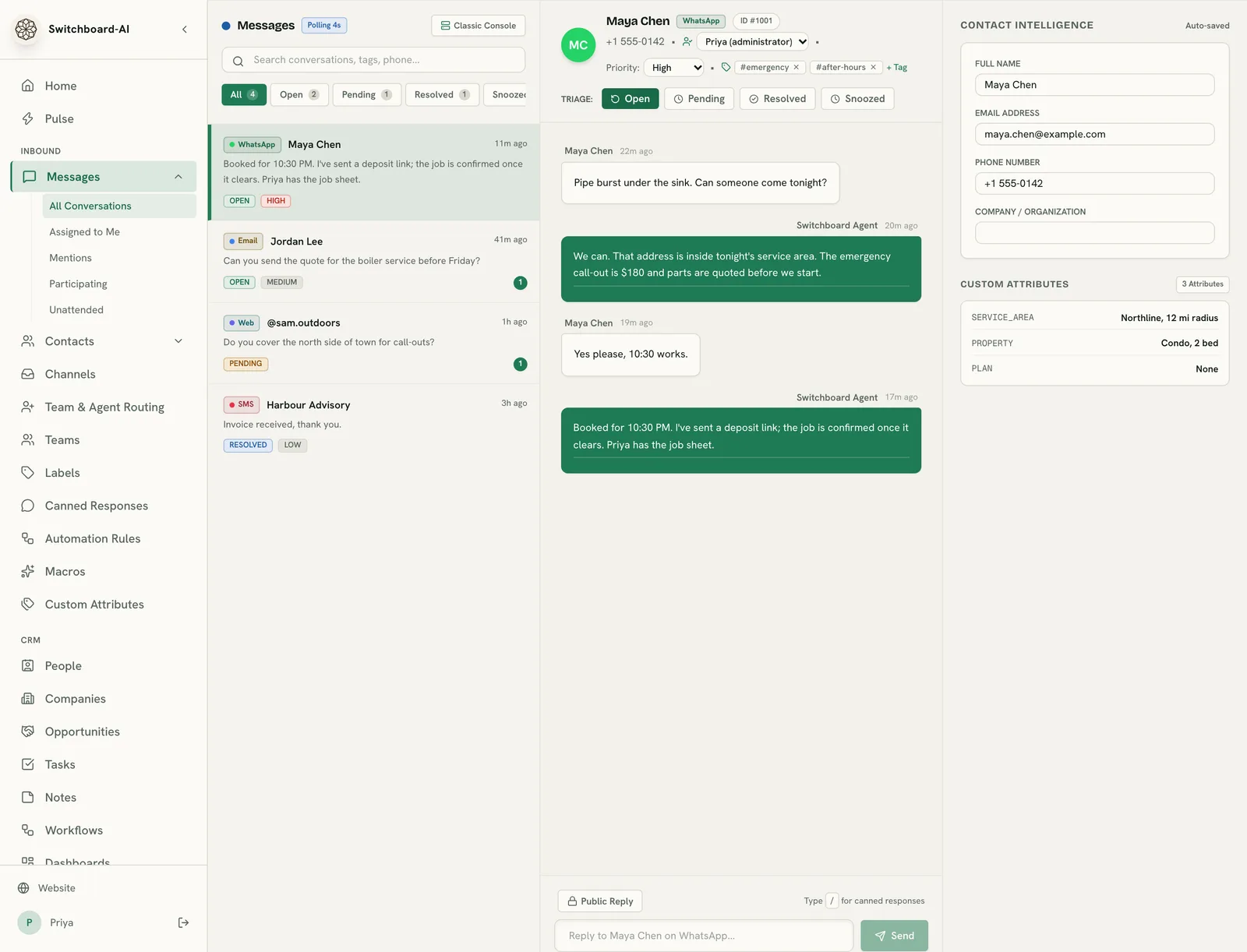
A pipe bursts at night and the message comes in while everyone is asleep.The AI checks the service area, offers the next slot and takes a deposit, so the job is booked before morning.
Via Callin.io reports: 85% of people who don't get an answer never call back. Callin.io, 2025
Going live
Live in days, not quarters.
Your team spends about an hour. We do the building, connecting and testing.
Design target
Switchboard setup
You describeYour first live conversation
Switchboard answersWhat should your front desk handle? Emergency plumbing and boiler repairs across Northline. Book call-outs tonight, quote the $180 call-out fee, and take a deposit before we send someone.
Connected: WhatsApp, Google Calendar, Stripe, Inbox.
- Pipe burst under the sink. Can someone come tonight?
- We can. That address is inside tonight's service area. The emergency call-out is $180 and parts are quoted before we start.
- Yes please, 10:30 works.
- Booked for 10:30 PM. I've sent a deposit link; the job is confirmed once it clears.
- whatsapp: new message from Maya Chen
- intent: emergency call-out
- calendar: 22:30 slot held
- crm: contact + emergency-repair deal
- payment: deposit link sent
- team: Priya gets the job sheet
Live. Answering on WhatsApp. Every conversation shows in your inbox.
Day 1
Build call
We walk through your top 20 conversations and connect your channels and systems.
Day 2
Agents built and tested
We write the playbooks, set the handoff rules and run your real questions through them.
Day 3
Live, with you watching
You approve, we switch on. Every conversation is visible in your inbox from minute one.
How we compare
One platform instead of three point solutions
Legacy helpdesks like Zendesk charge per seat; tools like Intercom charge per resolution. Switchboard ships the full stack — unified inbox, multi-agent routing, and multi-tenant ops — with zero resolution penalties.
| Feature | Switchboard | Intercom (Fin)Compare | Zendesk (AI)Compare | HubSpot (Service Hub)Compare |
|---|---|---|---|---|
Customer engagement Omnichannel inbox WhatsApp, Instagram, Facebook, Email, SMS, Telegram, Line, web — all in one view | Built-in | Not available | Built-in | Limited or add-on |
AI-powered auto-replies Autonomous agents responding with enterprise context, native RAG retrieval, and flat-rate operational predictability without per-resolution fees. | Built-in | Built-in | Built-in | Built-in |
Human handoff with context AI transfers to a human with full conversation history — no repeat | Built-in | Limited or add-on | Built-in | Limited or add-on |
CSAT, SLAs, and team management Real helpdesk features — not a chat widget pretending to be one | Built-in | Not available | Built-in | Limited or add-on |
AI & workflows Custom AI agents for your business Purpose-built agents tailored to your workflows — support, sales, booking, and more | Built-in | Limited or add-on | Not available | Built-in |
Multi-agent routing Switchboard routes to AI agents; competitors route to templates or human queues. | Built-in | Limited or add-on | Limited or add-on | Limited or add-on |
Bring any LLM Claude, GPT, Gemini, Mistral, Llama, DeepSeek — swap at will | Built-in | Limited or add-on | Not available | Not available |
Knowledge base & RAG Upload docs, crawl sites, vector search — agents answer from your data | Built-in | Built-in | Limited or add-on | Built-in |
Platform & ops Operator multi-tenancy Partner/agency features exist in helpdesks but not operator-grade isolation. Switchboard isolates billing, data, and workflows per tenant. | Built-in | Limited or add-on | Limited or add-on | Not available |
LLM observability & tracing Trace every token, every tool call, every latency spike — built in | Built-in | Not available | Not available | Not available |
MCP & plugin ecosystem Native MCP, webhooks, cron triggers, custom code, and extensible plugin tools | Built-in | Limited or add-on | Not available | Not available |
Flat platform pricing One monthly price — agents, channels, conversations, everything included | Built-in | Limited or add-on | Not available | Not available |
CRM & setup Built-in CRM People, companies and deals, filled in from conversations | Built-in | Not available | Not available | Built-in |
Set up and run for you Our team configures channels, agents and playbooks, then runs them with you | Built-in | Not available | Not available | Not available |
Flat platform rates. Zero resolution penalties.
Every tier includes white-glove managed setup, custom agent configuration, and unified inbox routing.
Starter
Predictable flat platform for single-brand customer engagement.
- 1,000 conversations/mo included
- 2 specialized AI agents
- Direct B2B & customer intake
- Unified omnichannel inbox
- Standard support & SLA
Pro
For scaling multi-channel operations and multi-team workflows.
- 5,000 conversations/mo included
- 5 specialized AI agents
- B2B + B2B2C channel routing
- Advanced knowledge base & RAG
- Built-in CRM
- Priority SLA & onboarding
Enterprise
Dedicated single-tenant infrastructure or BYOC with custom SLA.
- 15,000+ conversations/mo included
- Unlimited specialized agents
- Built-in CRM
- Custom API connectors
- White-glove setup + dedicated Slack
- Zero third-party data custody (BYOC)
Got questions? We've got answers
Everything you need to know about Switchboard and how it can transform your customer operations.
Accuracy and handoff
Switchboard enforces strict deterministic tool calling and escalation policies to ensure agents deliver accurate information or hand off to humans instantly.
Channels and setup
Switchboard integrates with your existing channels and brings them together in one inbox with no downtime or engineering lift.
Keys, data and pricing
Your data stays yours: encryption at rest, zero model training, and flexible deployment options from shared cloud to your own account.
Three ways to start. Each one starts with a person, not a signup form.
Book a walkthrough: a call with the founder about your channels and top questions.
Request a demoSee the agents work: three example conversations, start to finish.
Meet the agentsRead the delegation kit: what to hand over first, and what to keep.
Read the kit
See Switchboard in Action for Your Team
Tell us about your business and we'll tailor a live AI orchestration demo for your specific customer journeys.